What is Should I Click?
Should I Click is a free service to check if a website is safe to access. The great majority of attacks, including targeted attacks, start with a link in an email or chat. When you do not have enough time, or you do not know how to check the URL, should you click on it or not? Our Should I Click service could be helpful for you.
If you received a suspicious link or a website looks weird, Should I Click is the right and easy-to-use tool to analyse if it is safe to click. Should I Click uses a wide range of technologies, including machine learning, statistical analysis and security tools. The aim of this project is to help people at risk around the world (such as journalists, NGOs, political activists) against targeted cyber attacks. However everyone can use this service.
The shouldiclick.org project is a tool created in the Civilsphere laboratory at the Czech Technical University in Prague to help protect civil society for free.
How does Should I Click work?
When a URL is submitted, the URL is validated and information about the website is collected. The first information is taken from urlscan.io, a service that provides a very complex analysis of a submitted website — including a screenshot, HTML DOM, and a detailed description of the website's behaviour in JSON format.
In the next step, images and external JavaScript links are found in the HTML file and downloaded. When all data is collected, features are extracted from the urlscan JSON, from the downloaded images, and from the HTML files. Finally, an ensemble of algorithms predicts if the website is safe to click or not.
All results are from trained ML models and relevant static features. Should I Click does not use any whitelist, blacklist, or third-party tools for the final verdict.
The analysis concentrates on four detection signals:
Signal 01
Evil twins
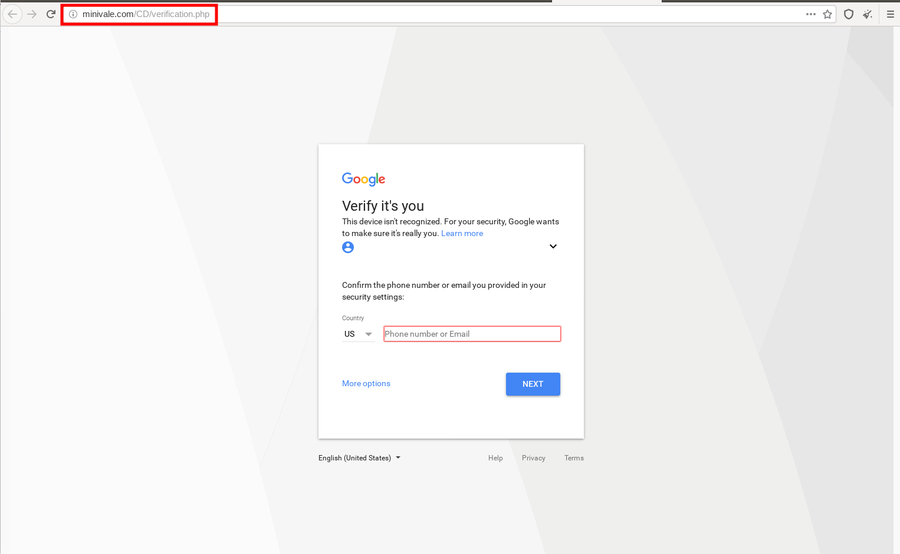
Evil twin websites are phishing techniques designed to steal emails, passwords, credit card numbers and other sensitive data by creating a copy of a website that looks identical to the original. Evil twin attacks are very hard to detect — users need to check the URL every time to make sure it is the correct site they want to visit.
In the example below, the page imitates a Google identity verification screen. However the domain is "minivale.com", not Google. Should I Click catches this class of attack by comparing page structure and visual layout against known brand templates.
Signal 02
Scam pages
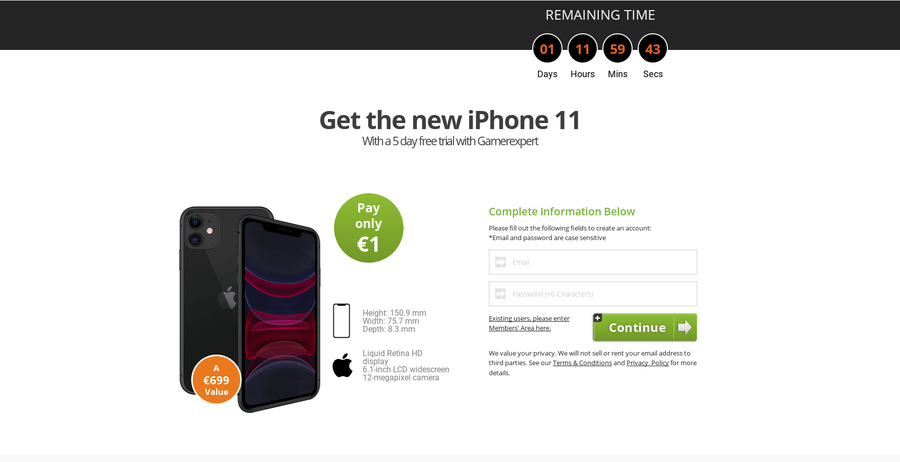
Like evil twins, scam websites are phishing techniques. Unlike evil twins they do not imitate a specific brand — instead they offer fake products or urgent incentives to steal credentials. The classic pattern is a time-pressured offer: "You won a new iPhone — you have 60 seconds to fill in your details."
Signal 03
Dangerous behaviour
Should I Click tries to detect harmful JavaScript code and cryptojacking attacks through several approaches. It uses a honeyclient to detect whether a website attempts to exploit the user's browser. It also flags redirect chains, drive-by downloads, and hidden scripts that execute the moment the page loads.
Signal 04
Unencrypted traffic
Ideally, every request a website makes should be over HTTPS. Should I Click measures how many of the requests generated by the page are encrypted. It also verifies the validity of the site's certificate and flags HTML login forms served without HTTPS — because those transmit private data in the clear, where anyone on the same network can read it.
How to use Should I Click
Copy the URL you want to check, paste it into the input field on the home page, and wait a moment while the analysis runs. Should I Click will tell you whether the link is safe to open.
Should I Click uses your feedback to improve. If you know a verdict is wrong, use the feedback buttons on the result page. This helps retrain our algorithms and produce better verdicts over time.
If you find a bug or an error, write to us.
Is Should I Click private?
We store your submission (URL, your IP address, timestamp, and our result). If you leave feedback, we store that too. We use the public API of urlscan.io to collect page analysis data — which means submitted URLs are processed by urlscan.io's infrastructure.